Generates polygons (closed polylines) by sequentially joining the individual points that define their perimeter. Useful for rebuilding area objects from boundary point sets (parcels, enclosures, plots, etc.). Points may be classified by an attribute; each distinct value groups its points to form a separate polygon, allowing multiple areas to be created in a single operation.
Available for AutoCAD, BricsCAD, ZWCAD and GstarCAD.
Create polygon from points
1. Run SPMPOINTSTOPOLYGON command
- Type SPMPOINTSTOPOLYGON in the command line and press Enter or search for the tool in the ribbon or toolbar.
2. Create polygon from selected points
- Select the points.
- Accept, and the polygon will be created by joining the points in nearest-neighbor order.
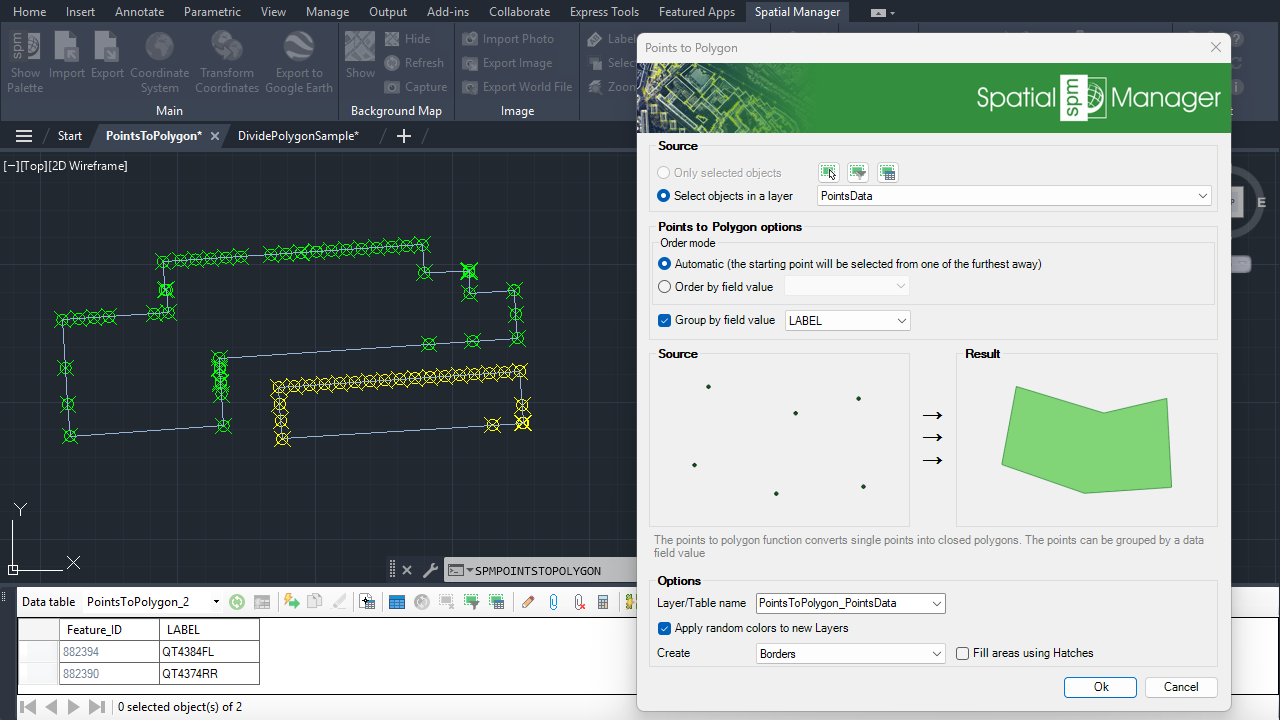
Points to polygon (grouped by data)
Create polygon from points (grouped by data)
1. Select points with attached data
- If you want to review the data attached to the points in a grid view, use the command SPMDATATABLEGRID.
- Run the SPMPOINTSTOPOLYGON command.
- Select the points (manually, by layer, by data table query, etc.).
2. Create polygons grouping points by their data
- Check “Group by field value” and select the field to group by.
- A polygon will be created for each group of points with the same value in the selected field.
- The created polygons will inherit the data from the points.
Note: Some features are available only in the Standard or Professional editions.



