Reduces the number of vertices in polylines or polygons to simplify their geometry, optimizing complexity while preserving the overall shape. This function improves performance and visualization of spatial data by removing unnecessary detail. When applied to adjacent polygons, care should be taken, as simplification may introduce unintended overlaps or gaps.
Available for AutoCAD, BricsCAD, ZWCAD, GstarCAD and Desktop.
1. Run SPMSIMPLIFY command
- Type SPMSIMPLIFY in the command line and press Enter or search for the tool in the ribbon or toolbar.
2. Select geometries and set tolerance
- Select the objects to simplify manually, by query, table or layer.
- Set the output layer and specify the tolerance for simplification. The tolerance parameter defines the maximum permitted deviation between the simplified geometry and the original.
3. Review simplified geometries
- The simplified geometries will have a reduced number of vertices while maintaining the overall shape. Review the results to ensure they meet your requirements or apply it again for further refinement.
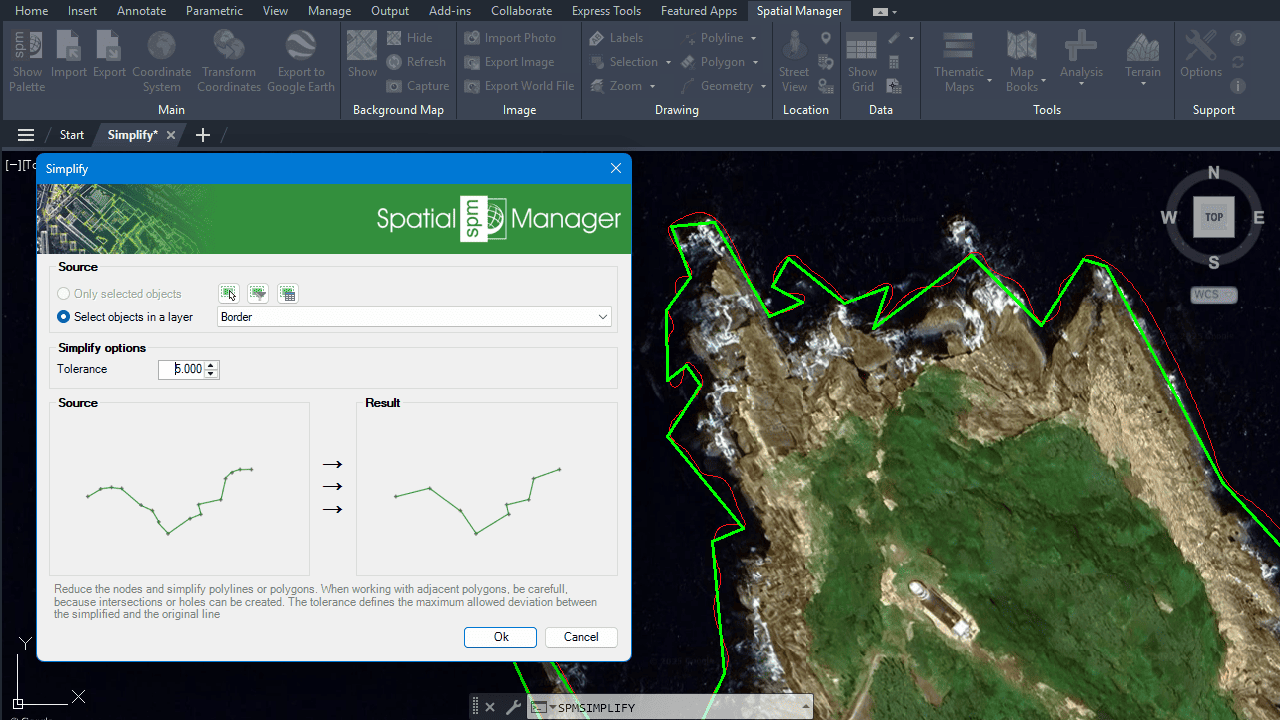
Simplified geometry
Note: Some features are available only in the Standard or Professional editions.



