Creates sheets for map books in a grid pattern or optimized for the best fit, minimizing the total number of sheets required. A rotation can also be applied to align sheets parallel to a specific object. This functionality is particularly useful in map books, a feature of Spatial Manager that allows users to create atlas-like presentations of maps.
Available for AutoCAD, BricsCAD, ZWCAD and GstarCAD.
1. Select template layout and view scale
- Run SPMMAPBOOKSHEET command.
- Select a layout to use as a template; the width and height will be used to maintain the aspect ratio.
- Define the scale for the view.
2. Select objects and alignment options
- Select objects around which the sheets will be created.
- The sheets can be created aligned in a grid or using width optimization to reduce the total number of sheets and avoid empty ones.
- Define rotation if required by setting the rotation angle or drawing it directly over the drawing.
3. Create sheets and map book
- Sheets are created and can optionally be used to create a map book, centering the layouts’ viewports on them.
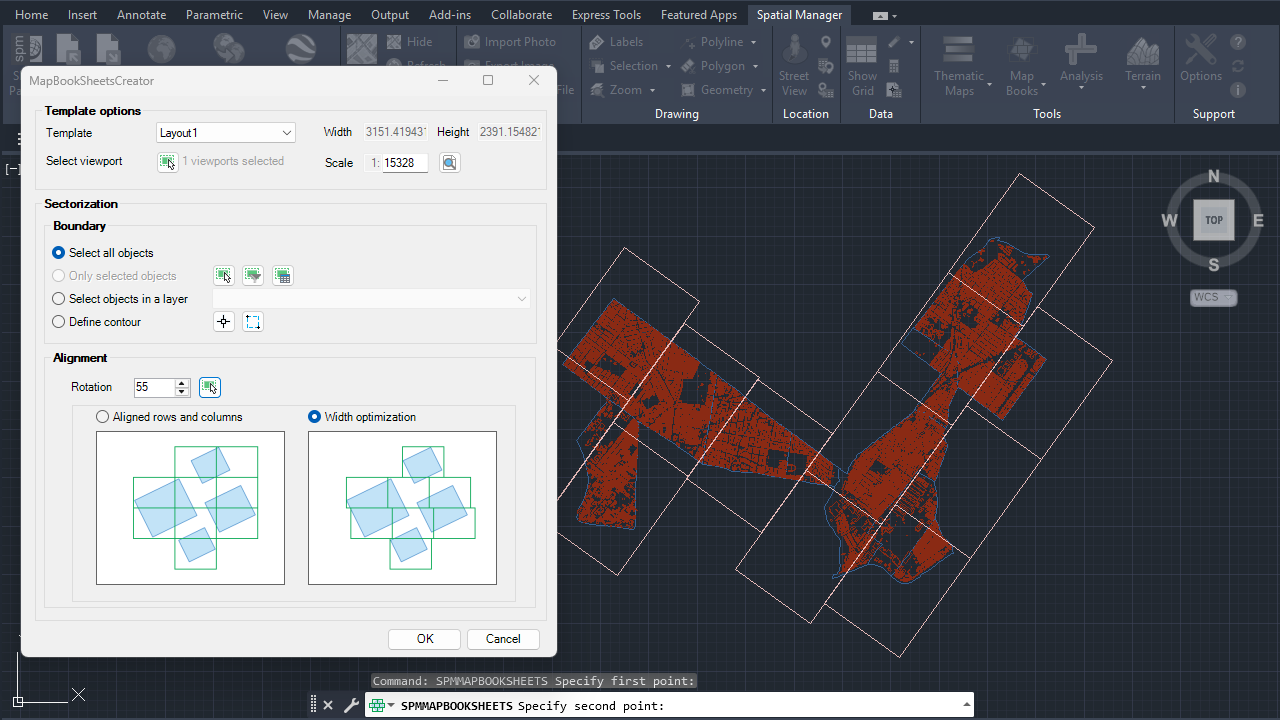
Map book sheets
Note: Some features are available only in the Standard or Professional editions.



