Convert AutoCAD Map object data to Extended Entity Data (EDD) and store it as Spatial Manager native tables. Then work directly with them or export to common GIS formats for broader use. Transfer your data and workflow to your preferred CAD platform.
Available for AutoCAD, BricsCAD, ZWCAD and GstarCAD.
Convert to native tables
- Execute the SPMDATATABLEDEFINE command.
- Click Object Data
- Select the tables to convert/import (topology tables can also be imported).
- You can also select Delete Object Data tables if you will no longer use the drawing with AutoCAD Map to reduce the file size.
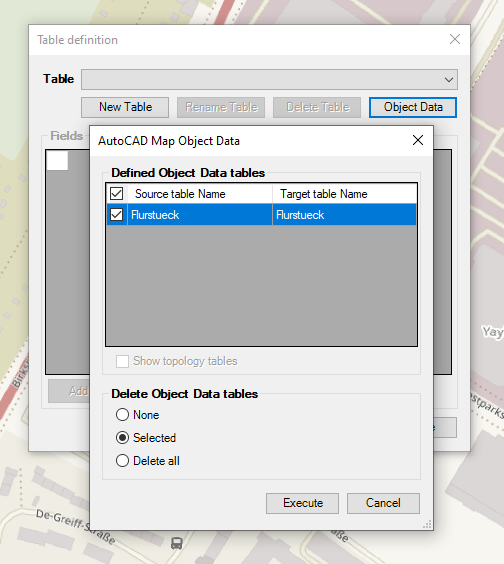
Import of AutoCAD Map Object Data
Work directly with Spatial Manager tables
- Review imported data in the data table grid by executing the SPMDATATABLEGRID command.
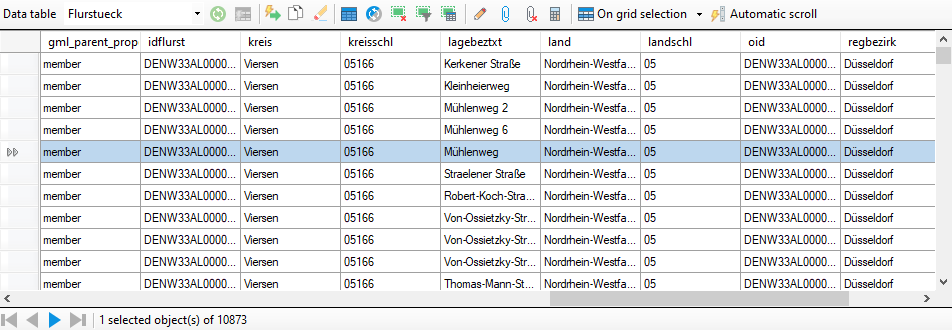
Work with data grid
Export directly AutoCAD Map Data to other common GIS formats and databases
- AutoCAD Map Data can also be exported directly from DWG to formats like Shapefile, KML, GeoJSON etc.
- You can export directly from the Spatial Manager palette or by using the SPMEXPORT command.
Note: Some features are available only in the Standard or Professional editions.



