GeoJSON is an open standard geospatial data format based on JSON (JavaScript Object Notation). The content is stored as plain text and structured to allow complex or compound geometries with attached data. The most common file extensions are .geojson, .geo.json and a generic .json.
Available for AutoCAD, BricsCAD, ZWCAD, GstarCAD and Desktop.
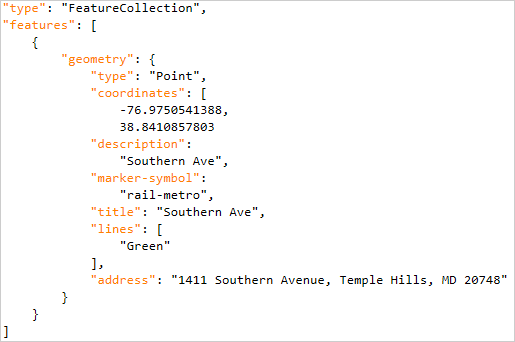
Sample of a GeoJSON file
Spatial Manager products include a data provider for GeoJSON files. It allows import to DWG and export or convert between multiple geospatial formats (Shapefile, KML, GML, SQLite etc.).
Import
- Spatial Manager for CAD (AutoCAD/BricsCAD/ZWCAD/GstarCAD) can import GeoJSON to DWG using the SPMIMPORT command or directly from the Data Sources palette.
- Spatial Manager Desktop opens GeoJSON and allows visualization and integration with other data sources.
Export
- Spatial Manager for CAD (AutoCAD/BricsCAD/ZWCAD/GstarCAD) can export from DWG to GeoJSON using the SPMEXPORT command or directly to Google Earth with the SPMCREATEKML command.
- Spatial Manager Desktop opens GeoJSON and allows visualization and integration with other data sources.
Convert
- From the Spatial Manager data sources panel, GeoJSON can be converted directly to other formats and the Coordinate Reference System can be transformed.
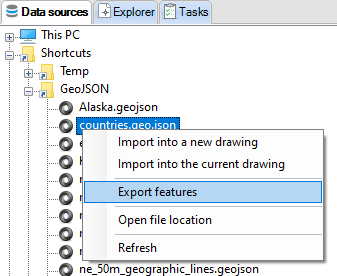
Import and export options for a GeoJSON file on Data Sources panel
Encoding
Like all text files, GeoJSON allows different encodings to represent different character sets for multiple languages (UTF-8, ISO-8859-1, Windows-1252 etc.). To ensure interoperability between different systems, you can select the character encoding during import and export.
Coordinate Reference System
The latest GeoJSON specification uses WGS84 as the coordinate reference system and decimal degrees as units for latitude and longitude. Some legacy files use other coordinate reference systems, even projected ones. Spatial Manager recognizes these as well.
Note: Some features are available only in the Standard or Professional editions.



