Creates the smallest convex polygon that fully encloses a selected set of geometries. This operation is ideal for generating bounding areas, simplifying complex datasets, and supporting spatial analysis. The resulting polygon provides the minimal convex envelope around the input features, ensuring complete coverage with the shortest possible boundary.
Available for AutoCAD, BricsCAD, ZWCAD and GstarCAD.
1. Run SPMCONVEXHULL command
- Type SPMCONVEXHULL in the command line and press Enter or search for the tool in the ribbon or toolbar.
2. Select the objects
- Select the objects for creating the convex hull manually, by query, table, or layer.
- Set the output layer and specify whether you want to create only borders (closed polylines) or filled polygons.
3. Create the convex hull
- The convex hull will be created automatically around the selected objects.
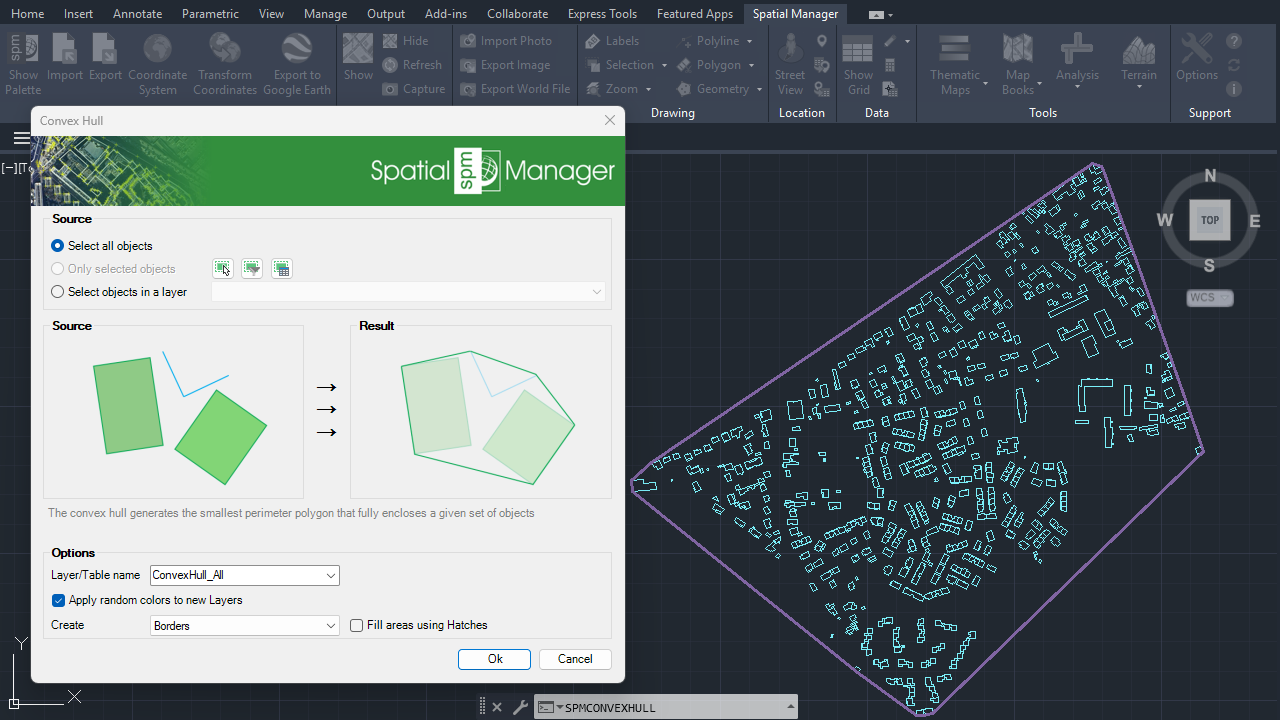
Convex hull
Note: Some features are available only in the Standard or Professional editions.



