SPM for ZWCAD > Features > Coordinate management > Transform drawings Coordinate System

Transform drawings Coordinate System in ZWCAD

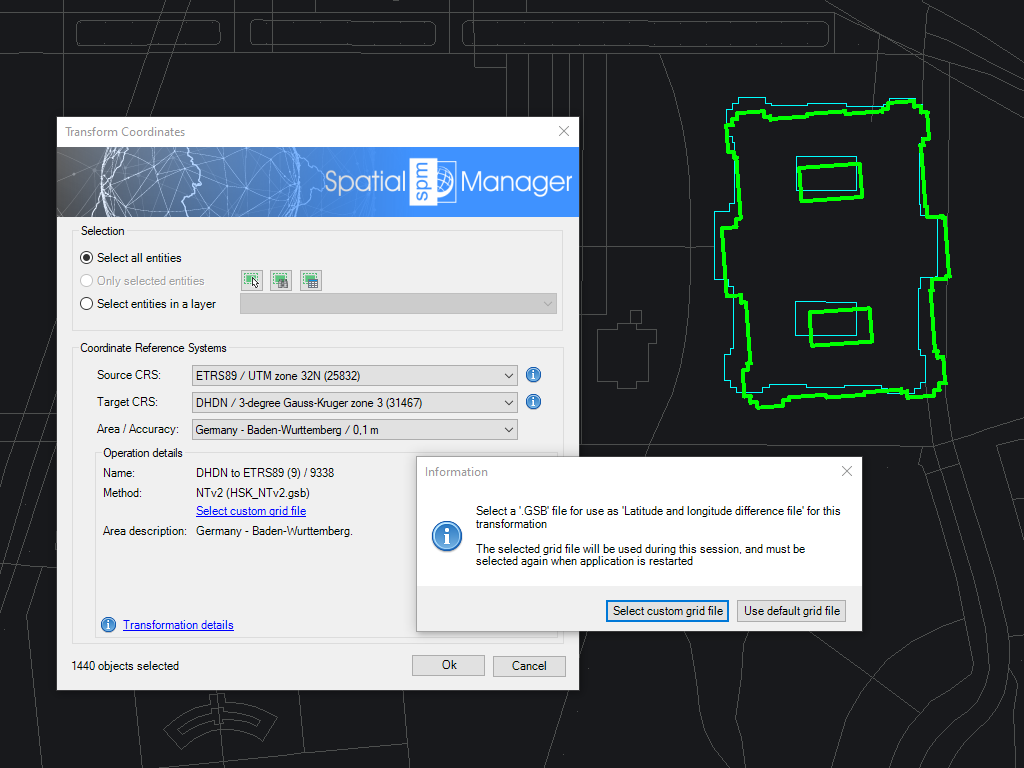
Transform the Coordinate System (CRS) of a whole drawing or a set of selected objects, which automatically creates a new drawing including geometrically regenerated objects from the current drawing according to the chosen transformation between two CRSs

Editions: Professional

Transform drawings Coordinate System

Transform the coordinate system of an entire drawing or selected objects with precision and ease. When performing a transformation, the software creates a new drawing where all objects are geometrically recalculated to reflect their new positions based on the selected source and target coordinate systems (CRSs).

This process ensures that spatial data aligns correctly within different geographic reference frameworks. Users can select from a wide range of predefined CRS transformations or define custom parameters to suit specific project requirements.

Resources and Information
frequently asked questions
Current compatible ZWCAD applications:
  • ZWCAD and ZWCAD Architecture
  • Professional edition (Classic and Standard editions are not compatible, but you can use Spatial Manager Desktop™ to import/export via DXF files)
  • Versions: From v.2017 to v.2026 both included. Review the version compatibility page for more details.
System requirements:
  • Windows 7 or higher, within the operating system versions supported by the ZWCAD version used
  • 500 MB free disk space, or more
  • Windows Installer 3.1 or later
Spatial files
  • Esri Shape file - (SHP)
  • Google Earth file - (KML, KMZ)
  • OpenStreetMap file - (OSM, PBF, OSC) (1)
  • LiDAR file - (LAS, LAZ)
  • GPS exchange format file - (GPX)
  • Esri ASCII Grid file - (ASC, ASCII) (1)
  • ASCII text file - (ASC, CSV, NEZ, TXT, XYZ, UPT)
  • SQLite file - (SQLITE, DB)
  • GeoPackage file - (GPKG)
  • GML file - (GML, GZ, XML)
  • Raster image file - (TIF, PNG, JPG, JPEG, TIFF) (1)
  • Autodesk SDF file - (SDF) (3)
  • MicroStation v.7 file - (DGN) (2)
  • AutoCAD DXF file - (DXF) (2)
  • Esri ArcInfo export file (ASCII) - (E00) (1) (2)
  • MapInfo file - (TAB) (2)
  • MapInfo interchange format file - (MIF/MID) (2)
  • GeoJSON file - (GEO.JSON)

Spatial raster files
  • Raster image file - (TIF, PNG, JPG, JPEG, TIFF) (1)
    • Georeference sources - (World files, Google Earth .GEPRINT, etc.)
  • Variable resolution Raster image file - (Cloud Optimized GeoTIFF/COG TIFF) (1) (4)

Spatial data servers and Geo-databases
  • Esri Geodatabase File - (GDB) (1)
  • PostGIS database
  • Microsoft SQL Server Spatial database
  • MySQL database (1) (3)

Image map servers
  • WMS/OGC API Maps Web Map Services (4)
  • WMTS/OGC API Tiles Web Map Tile Services (4)
  • XYZ/TMS Tile Map Services (4)

Other spatial data sources
  • Open Database Connectivity ODBC (1)
  • WFS/OGC API Features data store (1)
  • WFS data store (FDO) (1) (3) (5)
  • WFS data store (OGR) (1) (2) (5)

(1) Read-only
(2) OGR data source
(3) FDO provider
(4) Background Maps technology
(5) DEPRECATED - Whenever possible use the native WFS/OGC API Features data provider

Note: certain data Providers are only valid for some Editions of the application